5-inch Touch LCD for RaspBerry Pi
$63.39
$122.98
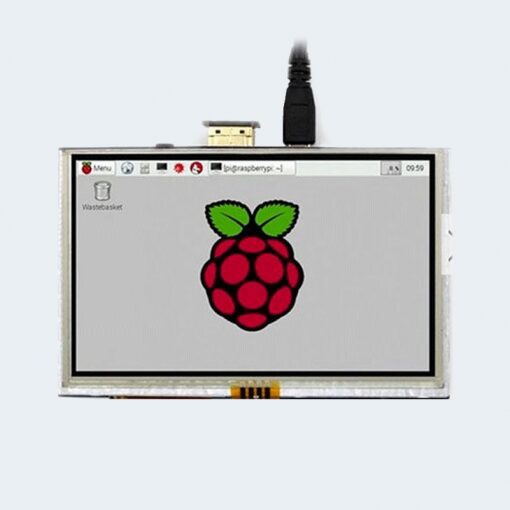
5-inch Touch LCD for RaspBerry Pi Product description 5inch standard display, 800 × 480 resolution With resistive touch screen, support touch control support backlight control alone, the backlight can be turned off to save power supports standard HDMI interface input, compatible with and can be directly inserted with Raspberry Pi (3rd, 2nd, and 1st generation) can be used as general-purpose-use HDMI monitor, for example: connect with a computer HDMI as the sub-display (resolution need to be able to force output for 800 x480) used as a raspberry pie display that supports Raspbian, Ubuntu, kali, Kodi(no touch), win10 IOT(no touch) work as a PC monitor, support XP,win7, win8, win10 system(do not support touch) CE, RoHS certification Product Parameters Size: 5.0(inch) SKU: MPI5008 Resolution: 800*480(dots) Touch: 4-wire resistive touch Product Size: 121.11*77.93(mm) Package Size: 154*135*51 (mm) Rough Weight(Package containing): 206(g) Power Dissipation: 0.34A*5V Hardware Description ① USB interface:Get 5V Power from USB, If ④-13*2 Pin Socket has been connected, that this USB interface can be No Connect ② HDMI interface:For HDMI transmission ③ Backlight Power switch:Controls the backlight turned on and off to save power ④ 13*2 Pin Socket:Get 5V Power from raspberry Pi to LCD, at the same time transfer touch signal back to raspberry Pi ⑤ Extended interface:extended The ④-13*2 Pin Socket signal Pin-to-Pin How to use with Raspbian/Ubuntu Mate/Win10 IoT Core System Step 1, Install Raspbian official image Download the latest image from the official download. Install the system according to the official tutorial steps. Step 2, Install LCD Driver Online Use SSH to connect the raspberry pi, And Ensure that the raspberry pi is connected to the Internet before executing the following commands: sudo rm -rf LCD-show git clone https://github.com/goodtft/LCD-show.git chmod -R 755 LCD-show cd LCD-show/ sudo ./LCD5-show How to use as PC monitor Connect the computer HDMI output signal to the LCD HDMI interface by using the HDMI cable Connect the LCD’s USB Touch interface (Either of the two MicroUSB) to the USB port of the device If there are several monitors, please unplug other monitor connectors first, and use LCD as the only monitor for testing. How to rotate the display direction This method only applies to the Raspberry Pi series of display screens, other display screens do not apply. Method 1,If the driver is not installed, execute the following command (Raspberry Pi needs to connected to the Internet): sudo rm -rf LCD-show git clone https://github.com/goodtft/LCD-show.git chmod -R 755 LCD-show cd LCD-show/ sudo ./XXX-show 90 After execution, the driver will be installed. The system will automatically restart, and the display screen will rotate 90 degrees to display and touch normally. ( ‘ XXX-show ‘ can be changed to the corresponding driver, and ‘ 90 ‘ can be changed to 0, 90, 180 and 270, respectively representing rotation angles of 0 degrees, 90 degrees, 180 degrees, 270 degrees) Method 2,If the driver is already installed, execute the following command: cd LCD-show/ sudo ./rotate.sh 90 After execution, the system will automatically restart, and the display screen will rotate 90 degrees to display and touch normally. ( ‘ 90 ‘ can be changed to 0, 90, 180 and 270, respectively representing rotation angles of 0 degrees, 90 degrees, 180 degrees, 270 degrees) If the rotate.sh prompt cannot be found, use Method 1 to install the latest drivers To download datasheet use this link (click here). نعتذر الشراء من الموقع متوقف مؤقتا We apologize : purchasing from our website is temporarily stopped
All Electronics Components